<body><script type="text/javascript"> function setAttributeOnload(object, attribute, val) { if(window.addEventListener) { window.addEventListener('load', function(){ object[attribute] = val; }, false); } else { window.attachEvent('onload', function(){ object[attribute] = val; }); } } </script> <div id="navbar-iframe-container"></div> <script type="text/javascript" src="https://apis.google.com/js/platform.js"></script> <script type="text/javascript"> gapi.load("gapi.iframes:gapi.iframes.style.bubble", function() { if (gapi.iframes && gapi.iframes.getContext) { gapi.iframes.getContext().openChild({ url: 'https://www.blogger.com/navbar/7821163539876256346?origin\x3dhttp://shazfx.blogspot.com', where: document.getElementById("navbar-iframe-container"), id: "navbar-iframe" }); } }); </script>

Wednesday, November 3, 2010

Simple Life = iTalk Whoa!

Let’s back trace our lives few years ago… heck make it 10 years ago! It wasn’t this busy although we are already surfing the net, chatting on chatrooms – forums… and meeting up with them in IRL – In Real Life.

Now, with social media such as Facebook, Friendster, Twitter, MSN and NEWS that comes in constantly no matter what time it is… day or night! We can consider ourselves lucky now coz back then NEWS take yonks to go through one to another…

Remember the NEWS on Fuel hike many many years ago! That you found out via Newspaper / Radio and later on via news sites (or perhaps even blogs). But this medium takes time to get to you… and by the time you realize it, fuel prices has already gone up. Now with the different types of social media… (i.e.: Twitter, Facebook) you get all these updates almost instantaneously!

Now, there’s almost everything that can make your life simpler… and one of it is RSS feeds! What are RSS feeds you might ask! Well RSS stands for “REALLY SIMPLE SYNDICATION”. Hence the shortform R-S-S.
iTALKWHOA

The beauty of RSS Feeds:

RSS Feeds enable you to get news feeds and updates on any topics that interest you fast and easy. You don’t have to check or be on the lookout on what’s coming.

It delivers the headline, short summary and a link back to the full text every time an RSS news feed is updated.

How does it benefit you?

· If you have been worried about giving your name and email address to subscribe to any newsletter, the RSS feed in iTalk Whoa! has come to your rescue. Subscribing to RSS feed does not require you to do so. No more e-mails and no spams too. Your privacy is assured.

· You will get updates automatically on your iTalk Whoa’s account.

· For those who have got used to bookmaking pages, this is no longer necessary.

· If you are a content owner or publisher, you are able to distribute your contents without being sent to the junk folder.

How to configure RSS feeds on your iTalk Whoa’s account?
iTALKWHOA!

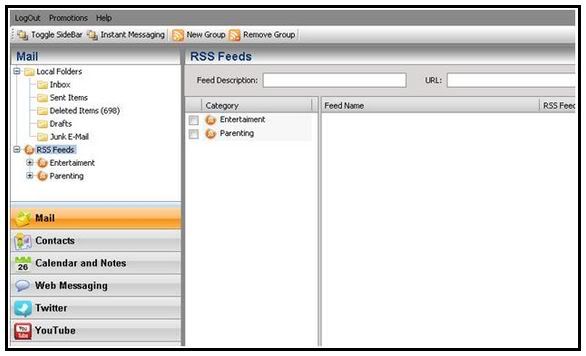
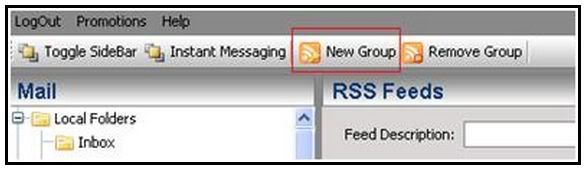
Select the RSS Feeds under Mail panel and click on New Group to create a new category/group
iTALKWHOA

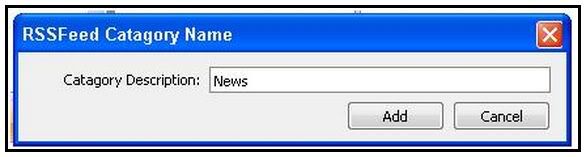
Pop up box [RSSFeed Category Name] will appear and please input any name for the new group – example News.

Photobucket

Then click on button [Add]
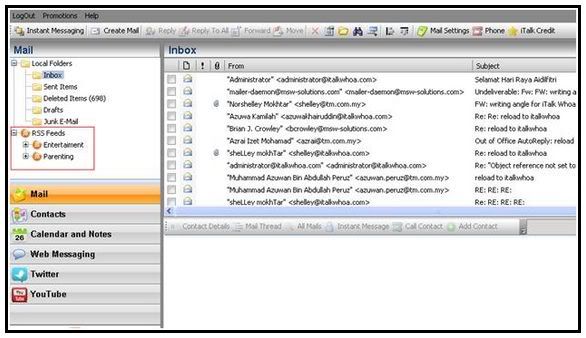
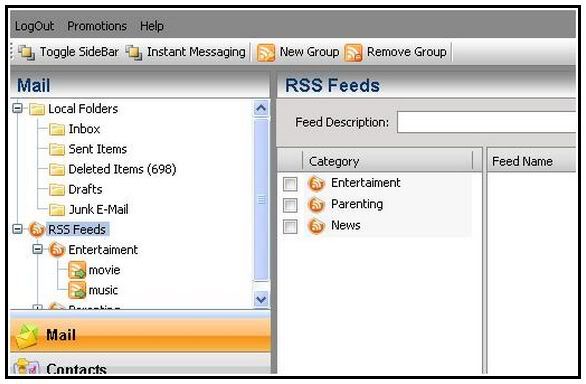
Automatically the News Feeds will appear in current Category Panel as below:
Photobucket

To input any info on News category, just search for RSS News that interest you. In the example, the feeds gather from The star newspaper.

Just go to the The Star Url - http://thestar.com.my/

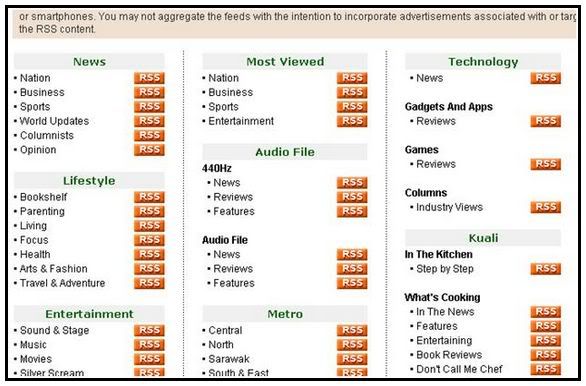
Scroll further down till the end of the webpage and you will see image as below:

RSS Feed iTALKWHOA

The RSS icon placed on the right side and click on it.

You may input or place any RSS in iTalk Whoa! for any website that have the RSS icon

You may get RSS Feeds from:

· Any newspaper – The star [http://thestar.com.my/rss/]

· At PC/Entertainment website – Apple [http://www.apple.com/rss/]

· At blogger website
iTALKWHOA!

Shown above the link for RSS Feeds in The Star newspaper. Thus you can just choose any topic that interests you the most. In this example, Sport under News been selected.
Photobucket

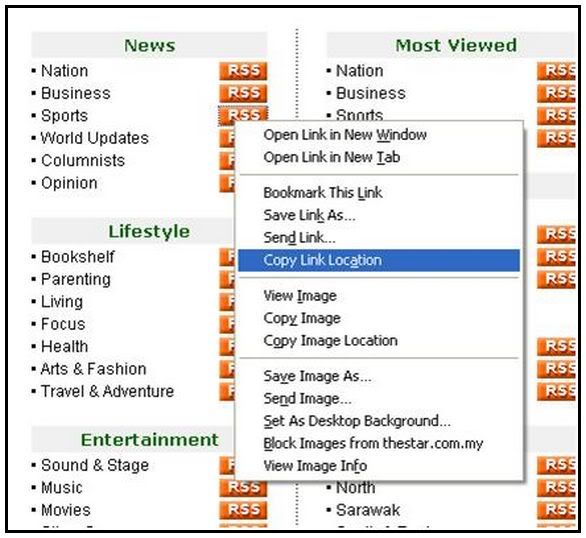
Just right click on the RSS icon besides the Sport News and select ‘Copy Link Location’.

RSS iTALK

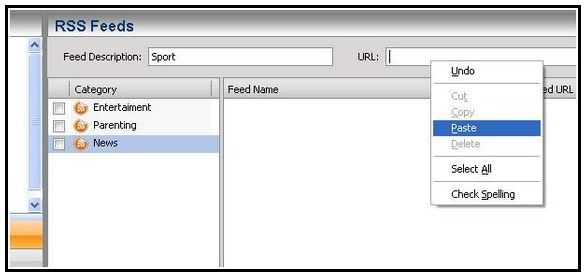
Go back to your iTalk Whoa’s account and highlight the News icon, input ‘Sport’ under ‘Feed Description’ and paste the url copied previously.
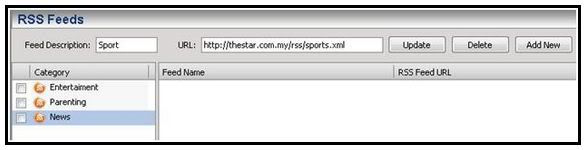
iTALKWHOA!

The Sport RSS url will appear and click ‘Add New’ button and the Sport RSS will appear in the Feed Name Box as below:
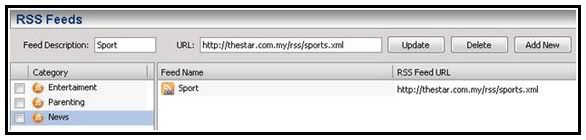
iTALKWHOA!

To view all the RSS Feeds for sport, just click on Sport under News at the Mail Panel:
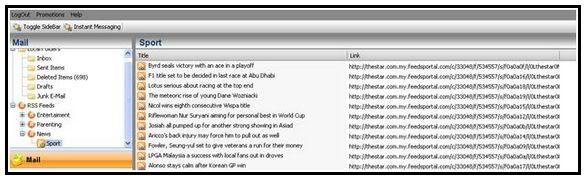
RSS Feed iTALK TM
All the Sport highlights will be display in split second and you can just click on any link to read/view the full story of the day.


Notes:

Sometimes, the link create does not appear immediately. Thus user need to wait for a few minutes before the link to appear. Or user may logout and login again into iTalk Whoa! to view the link.

See how easy RSS is on iTALK WHOA!
For me, whatever that makes my life easier, faster and helps me in my daily routine RAWKS!!!

I’ve updated my RSS feeds on iTALK WHOA! Have you updated yours???
Be sure to check-out the RSS feed function on your iTALK WHOA! Today… http://www.italkwhoa.com/

Labels: , , , , , , , , ,

Sunday, April 11, 2010

WHOA!!! All Nite LONG

Wasssuppp Shaz: WHO ON EARTH doesn't want free MONEY??? Well... i know how u can get RM5 in terms of free credit to call & text your friends via this new platform, an online website/application that unifies all the social media & messaging system - last but not least VOiP & SMS. What is it? It's the iTALKWHOA! by TM.

Wanna save on voice calls (international or local), wanna send a text message for less, it's all so easy with iTALK WHOA! No installation needed, you just simply need to Log on to the website and register as a user.

Photobucket
As i entered the event...

Photobucket
TM Reps for Question & Answer session

If you're lucky enough to be the first 8000 to try out this service by TM - you'll receive instantly an online credit of RM5 to make your very first VOiP phone call & SMS to your friends!!! Really... it's cheap, it's clear, and it's easy.

Not just that, you can Log on to your messaging service, check Facebook messages - comments - notifications, Twitter, Gtalk and much more all from this platform. You can then keep all your complicated passwords at home tucked in a book somewhere safe and just use this one Login and Password! No more confusions, no more hassle!


Last Wednesday, 7th April - i was invited to the launch of iTALK WHOA! by TM at Borneo Rainforest CLUB @ Bdr. Sunway. Where i met up with so many blogging friends from the past, those who i haven't seen for a long time and those who's been so busy to meet up. They were all there. It was like a blast from the past.

Anyways, managed to get an insight of what iTALK WHOA! is really all about, its technical functions, and all. Basically it's made to HELP you and i in our everyday life. To simply make everything simpler and easier!
  • Just imagine this what if your phone runs out of battery! And there's no way for you to charge it! You can just go to any computer / online terminal log on to iTALK WHOA! and send a text msg to your friend to help you / save you / meet you! - Rather than having to go back all the way home right.
  • Another scenario would be when you forgotten to bring your phone out with you, just logon to your laptop from anywhere with Wi-Fi and make a voice call to your friend, very easy and simple.
Whatever it is, it's meant to help make your life easier... The only thing is, for now you would have to use Internet Explorer (IE) to log on to the service and to use it as it's currently not compatible with other browsers. But soon enough it will be ready for Google Chrome, Firefox and more...

On the other hand... met up with so many friends here at the event, was even pulled up on stage to play a stage game but at first i was about to win the game but for some technical reasons i LOST :( But oh well.. i could've won a Panasonic DECT Cordless Phone! Woohoo.. COULD HAVE is a very BIG WORD!

Anyway - BUNKFACE! Was there to perform a few numbers from their album "PHOBIA PHONEY"!!! Check'em out :)

Now let me hear it... iTALK...:

WHOA!

Photobucket

Photobucket

Photobucket

Photobucket

Photobucket

Photobucket

Photobucket

Photobucket

Photobucket

Photobucket

Photobucket

Photobucket


More about iTALK WHOA!:

1. A Unified Messaging and Convergence platform providing single-point-access to Messaging & Collaboration systems.

2. Provides and interface that enables users to synchronize all the email accounts, social networking sites to enable them to connect, communicate and collaborate with their families and friends.

3. You can email, SMS, make calls, connect with instant messaging and even read your favorite news through just one portal,all you need is internet access.


More than just SERVICES:
  • Webmail that integrates with major webmail services such as MSN, Yahoo! and Gmail also with real-time true push of emails & attachments

  • Push eMail with real-time true push of emails & attachments that works with any mobile device without the need of a local client

  • Calendar & Task that is capable to assign calendar information and create tasks to be shared with other users within their desktop or mobile workspace

  • Instant Messaging (IM) which enables multiple Chat servers integrate into one IM Chat and no need for external service providers

  • Voice Call to communicate from PC with the lowest calling rate

  • Web SMS to send web sms from portal to any phone (local mobile/international mobile/fixed sms)

  • Synchronization of data between desktop applications, mobile devices and vice-versa

  • Integration Framework

  • Social Networking Streams with a seamless ITalk Whoa! integration with the most popular business & social networking services

  • Security• Digital Certificates for establishing network connection using Secure Sockets Layer (SSL) Protocol with end-point security management.Stored data accessible by all users within or across security domains Full anti-virus, anti-spam controls.

How to USE it?

  • If a user is overseas and wanna use the iTalkwhoa is it possible? What are the charges like?
This is a portal service, regardless where ever you are from; the rates are applicable as it will be in the list.

  • Means all they need to do is log into italk whoa and they can do all that?
Yes! You have to register as a member first. While for 1st time user, you have to key in your password for you ie: twitter, email (yahoo, gmail, hotmail) etc for all at just one time. It will configure with your iTalkWhoa login password. You just have to key in 1 iTalkWhoa password next time, all others function will be automatically login.
  • So they just nd to sign up with italk whoa and thats it?
Pretty much YEAH :)

  • It is also mention about prepaid or buy credit. Where can ppl buy their credit/ prepaid card for italk whoa?
TM will provide this service really soon, hopefully somewhere in June 2010 for all users worldwide to purchase. But for now, you can purchase iTalk credit at Maybank2U, CIMB Clicks and all stores displaying iTalk. Only Malaysians are able to purchase for NOW.

  • Will they be sold at phone shops in future just like the other phone cards or idd cards?
Yes, but only in Malaysia. iTalk are sold at shops displaying iTalk sign.

Labels: , , , ,

\

Photobucket

Hello, my name is Shaz (25)
Producer.Radio Announcer.Emcee.
Blogger.Photographer.EventOrganiser
AMP Radio Networks (ASTRO)

shazfx[@]gmail[.]com
shazlib777[@]hotmail[.]com


Photobucket Photobucket Photobucket


  •  


  • Powered by Blogger


    Add to Google Reader or Homepage

    Add to netvibes

    Creative Commons License
    This work is licensed under a .
    Photobucket


    Blog Coding & Design by